
Fewer manual checks
Routine checks and record updates move with the process.
Club automation
Archery Manager automates registrations, renewals, payments, communications, tasks and follow-up—so your team spends less time on administration and more time on archery.
Simple CSV onboarding. Free email support. One connected system for your club.
One action. Everything connected.
Illustrative joining workflow. Required club approvals stay in place.
Routine checks and record updates move with the process.
People know what happens next and what they need to do.
Payments, reminders and tasks stay connected.
Timely confirmations and useful information, without the chase.
Automation in action
One action starts the next steps. Explore how the work moves from registration to activation, from booking to arrival, and from a reported problem to an assigned task.
Starts when: Someone starts joining the club.
Complete the required information, documents and agreements.
Match completed payment to the membership application.
Review the application and record required safety clearance.
Activate once conditions are met; send welcome and app information.
Keep membership dates connected to the renewal reminder process.
Requirement tracking, payment checks, next-step emails, reminders, activation and welcome messages.
The club retains application approval, identity concerns and safety clearance where those are required.
For the clubA clearer route from interest to active membership, with required checks kept in place.
For the people running itReview completed applications instead of checking each form, payment and welcome message by hand.
Starts when: A member or guest registers for an activity.
Select the session or program and complete the applicable participant details.
Apply the activity’s eligibility, pricing and capacity rules.
Confirm eligible paid group/program bookings and email the live admission pass.
Use the instructions, reminders, participant list and check-in workflow.
Availability checks, payment confirmation, booking updates, applicable passes, reminders, waitlist offers and participant lists.
The club sets the offerings, prices and terms, and handles exceptional cancellations or special arrangements.
For the clubMembers and guests can secure a place and arrive with the information they need.
For the people running itSpend less time answering availability questions, confirming payments and rebuilding participant lists.
Starts when: An email enquiry reaches the club.
Identify the enquiry and the appropriate handling route.
Use approved club information and permitted records for the response.
Send eligible automatic answers; route matters that require judgment.
Keep the conversation and delivery state available for follow-up.
Enquiry classification, routine email answers, routing, sending records and follow-up on unresolved messages.
Complaints, sensitive personal matters, incidents and policy exceptions stay with authorized people.
For the clubRoutine enquiries receive useful answers and unresolved matters remain visible.
For the people running itHandle the questions that need judgment instead of writing the same routine answers repeatedly.
Starts when: Equipment service becomes due, or a member submits a maintenance report.
Generate a task from the service plan or maintenance request.
Carry the equipment, location, description, evidence and instructions into the job.
Follow due dates, overdue work and unresolved critical issues.
Record the work and evidence, with the club retaining equipment and range safety decisions.
Task creation, routing, assignment context, due-work reminders, escalation and reporting.
People carry out the repair or inspection and decide whether equipment or the range is safe to use.
For the clubPlanned servicing and reported problems become visible work with an owner and a history.
For the people running itStop relying on memory or scattered messages to create jobs, chase deadlines and check progress.
Starts when: The club’s reporting cycle or oversight review comes around.
Use the relevant membership, activity, payment and work records.
Produce the configured summaries and reporting material.
Surface overdue responsibilities, unresolved approvals and exceptions.
Use the history and context to make decisions and assign follow-through.
Recurring summaries, reporting preparation, exception lists and recorded action history.
The committee keeps financial oversight, policy decisions and responsibility for the actions it authorizes.
For the clubThe committee gets a clearer view of membership, participation, payments and outstanding responsibilities.
For the people running itSpend less preparation time assembling recurring figures and more meeting time deciding what to do.
Real results for busy clubs
Less routine work for your operators. A clearer experience for the people taking part.
Routine enquiries get answers and completed steps trigger the next confirmation.
Requirements, reminders and assigned work remain connected and visible.
Your team spends less time checking records, sending repeat messages and chasing updates.
Keep human decisions human. Automate the rest.You set the rules. Your club retains required approvals, sensitive matters and safety decisions.
Renewals that are followed through
Membership renewal connects reminders, recorded status, member communication and access privileges. The process continues when someone renews—and when they do not.
Before membership expires
The system reminds the member to renew. A completed renewal updates the membership record and its dates.
At unrenewed expiry
With the separate access-control system installed, the expiry process also revokes the corresponding physical access permissions.
After unrenewed expiry
If membership remains unrenewed, app login is revoked.
They re-register. Archery Manager recognizes who they are and takes them through the registration and payment process. Returning to the club follows the membership conditions that apply.

AI-powered email enquiries
AI automatically answers routine email enquiries using approved club information and the records it is authorized to access. The conversation can move forward without a team member composing every reply.
Members and guests can take the next step
Members find activities, register, pay and manage their participation. Archery Manager handles the connected records, confirmations and reminders—without another message to your team.
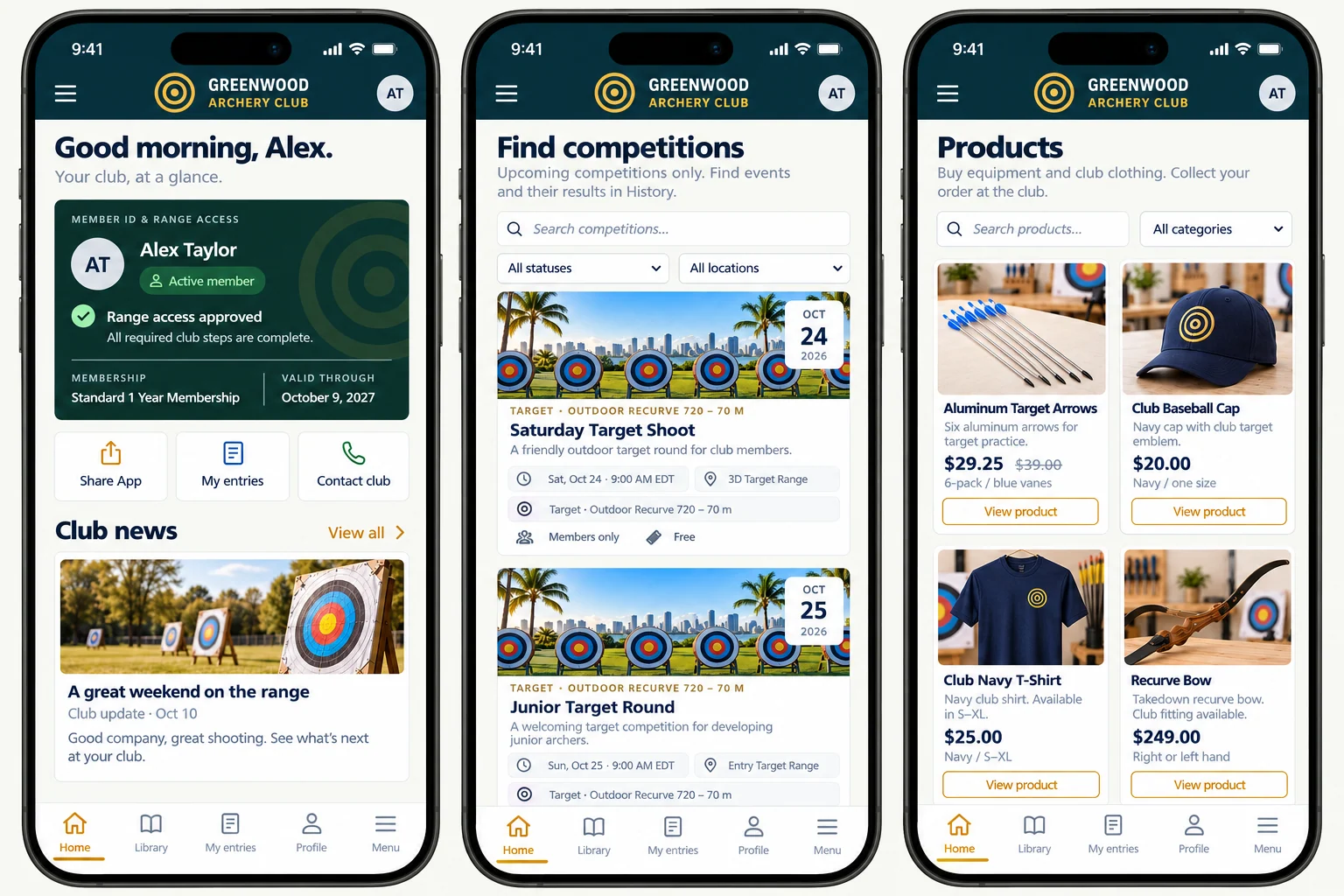
Automation across the whole club
Scan the work your team can stop doing manually. Open any area for every automated step and its impact.
From an application to an active member.
Guide joining through information, documents, payment and required club checks. The system follows up on incomplete steps, progresses completed requirements and sends the welcome when membership becomes active.
For the clubA clearer route from interest to active membership, with required checks kept in place.
For the people running itReview completed applications instead of checking each form, payment and welcome message by hand.
The reminder is only the beginning.
Keep renewal messages, recorded membership status and access privileges connected. Reminders run before expiry, and an unrenewed membership follows the defined expiry process without someone manually chasing each record.
For the clubMembership dates, eligibility and access follow the same renewal status. Returning members have a route back.
For the people running itStop maintaining a separate reminder diary or manually chasing every expiry and status change.
Book it. Pay for it. Turn up ready.
Move members and guests through available coaching, lessons and programs with eligibility, places, payments, reminders and participant information connected. Waitlists and released places are handled within the activity workflow.
For the clubMembers and guests can secure a place and arrive with the information they need.
For the people running itSpend less time answering availability questions, confirming payments and rebuilding participant lists.
A group experience with less coordination.
Take a private group from enquiry and an approved package offer to invitations, guest registration, payment, preparation and check-in. Keep the organizer informed without rebuilding the guest list by hand.
For the clubGroup organizers get a coordinated booking and registration process, with preparation tied to the event.
For the people running itFollow outstanding guests, equipment needs and staff tasks in one workflow instead of piecing them together from messages.
A payment that moves the right process forward.
Connect a successful payment to the membership, booking, entry or order it belongs to. Send the confirmation, keep pending payments under review and bring mismatches or exceptions to attention.
For the clubPayments move the correct membership, booking, entry or order forward, with exceptions visible.
For the people running itReduce repeated payment checks and confirmation messages; focus attention on mismatches and outstanding amounts.
Less event administration. More attention on the shoot.
Run scheduled registration, participation checks, grouping, officials’ assignments, scoring progress and standings as connected competition processes. Members and guests can register, pay, participate and score their group’s results.
For the clubEntries, eligibility, scoring and results stay connected through the competition process.
For the people running itReduce repeated entry administration and result handling, leaving more attention for running the shoot.
The routine email gets an answer.
AI reads routine club enquiries and automatically answers using approved club information and authorized records under the club’s controls. Requests needing judgment reach the responsible people with their context.
For the clubRoutine enquiries receive useful answers and unresolved matters remain visible.
For the people running itHandle the questions that need judgment instead of writing the same routine answers repeatedly.
Keep club information moving across channels.
Reuse eligible activity information, publish and expire scheduled content, and update the website, calendar, news and signage. Keep private events and restricted information out of public feeds.
For the clubMembers can find current club information across the club’s communication channels.
For the people running itReduce repeated publishing work and the need to answer questions caused by outdated information.
From purchase to the next action.
Connect products, specials, availability, payment, fulfillment and collection notices. Coordinate service appointments and equipment follow-through while keeping purchasing and safety decisions with the club.
For the clubPurchases and service bookings carry their payment and fulfilment steps with them.
For the people running itFollow the orders and appointments needing action without manually sending every update.
A reported problem becomes work to do.
Create maintenance tasks from equipment service plans and member reports with photos and descriptions. Route the job, attach its context, follow due dates and track the recorded outcome.
For the clubPlanned servicing and reported problems become visible work with an owner and a history.
For the people running itStop relying on memory or scattered messages to create jobs, chase deadlines and check progress.
The right people know what needs doing.
Connect shifts, availability, confirmations, instructions and reminders for staff and volunteers. Flag gaps and conflicts, record permitted time and route unusual records or expiring qualifications for review.
For the clubClub work has clearer responsibilities, deadlines and follow-through across staff and volunteers.
For the people running itReduce repeated assignment messages and status chasing; see who needs to act and what is overdue.
Membership rules reach the entrance.
Apply access eligibility, approved schedules and temporary permissions through the installed access-control system. Update permissions when membership changes and keep denied access or device issues visible.
For the clubEntry permissions follow the club’s membership and access rules through the separate access-control system.
For the people running itReduce manual permission changes and checks while retaining responsibility for access policies and exceptions.
A useful reason to stay involved.
Welcome members, surface relevant activities and follow up on incomplete participation. Connect feedback, beginner progression, inactivity follow-up and renewal-season communication with the club’s preferences and rules.
For the clubRelevant reminders and follow-ups help members see opportunities to take part again.
For the people running itFollow up consistently without maintaining separate lists of people to contact after each activity.
The committee gets the picture without assembling it.
Prepare membership, participation, payment and work summaries automatically. Bring exceptions, overdue responsibilities and decisions together, with a history that supports oversight and handover.
For the clubThe committee gets a clearer view of membership, participation, payments and outstanding responsibilities.
For the people running itSpend less preparation time assembling recurring figures and more meeting time deciding what to do.
Automation with your club’s rules
The club sets its plans, activities, prices, requirements, approved information and access policies. Archery Manager moves routine work through those processes and keeps the records connected.
Approving an application, making an official competition decision or deciding whether equipment is safe still belongs to an authorized person. The reminders, preparation, routing and recorded next steps around that decision are automated.
Explore the Admin systemMore of the work, already moving
Bring connected automation to the way your club welcomes, books, communicates and operates.
Questions worth answering here
No. Reminders are part of it, but the workflows also connect registration requirements, payment confirmation, membership activation, bookings, admission passes, access status, maintenance tasks, reporting and other club operations.
Yes. AI automatically answers routine email enquiries using approved club information and authorized records under the club’s controls. Sensitive or unclear matters and policy exceptions are routed for review.
Reminders are sent 30, 15, 7 and 3 days before expiry. At unrenewed expiry, membership access privileges are revoked, an explanatory email is sent and the app status turns red. App login is revoked 14 days after expiry if membership remains unrenewed. Physical permission changes use the separately provided access-control system.
Yes. They re-register. The system recognizes the returning member and takes them through the registration and payment process, subject to the club’s membership requirements.
Yes, for the activities open to them. Member and guest participation follows the club’s eligibility, prices, capacity, agreement and booking rules. Private group guests can use the group’s registration flow without becoming club members.
Service schedules generate due tasks. Member maintenance reports—with photographs and descriptions—feed the task workflow. Equipment, location, instructions and assignments stay connected, with reminders and escalation for outstanding work. People carry out the work and retain safety decisions.
No. The club defines the rules, requirements and permissions, and authorized people keep approvals, sensitive matters, official decisions and safety judgments. The system handles the surrounding routine work and follow-through.
The Pricing page explains the current plans, AI usage terms and separately charged access-control hardware and subscription.
Submit your club request. We verify the club and requester before approval and setup. Your club then imports its members using the supplied CSV template and detailed instructions. Free email support is included.