Archers taking part in a session at an outdoor club range

The whole club.
Every part connected.

Archery Manager brings memberships, competitions, coaching, payments, communication, bookings and daily club operations into one connected system for archery clubs.

Built for real archery clubs.Simple CSV onboarding. Free email support.

20 clear feature areas. One photo and overview for each. Open a feature’s list to explore every capability, or search for exactly what your club needs.

Bring Archery Manager to your club
Illustrative archery club photography for Process Automation
Illustrative club photography

Feature 01 / 20

Process Automation

Less checking. Less chasing. More doing.

Let routine club processes carry the next step forward. Archery Manager connects registration follow-ups, membership reminders, payment confirmation, booking passes and recurring maintenance tasks. Your team can see what needs attention instead of repeatedly checking separate records. Clara can also help with eligible enquiries under the club’s chosen controls, while approvals, safety checks and official decisions stay with the right people.

See process automation
Explore what’s included12 subfeatures explained
  • AI messaging centre

    Classify routine enquiries and prepare or send eligible replies under the club’s chosen controls, with sensitive or unclear cases for review.

  • AI feature and usage controls

    Choose enabled AI features and review usage. See the Pricing page for the included allowance and additional usage charges.

  • Connected workflow administration

    Connect routine membership follow-up, bookings and recurring tasks while retaining the required human approvals.

  • Registration follow-ups

    Send the appropriate next-step message as recorded joining requirements are completed, including approval and orientation instructions.

  • Renewal and expiry reminders

    Prepare membership renewal and expiry messages so members know when to act.

  • Payment-to-booking confirmation

    Check payment outcomes and confirm eligible group and program bookings when payment succeeds.

  • Admission pass delivery

    Email confirmed participants a live admission-pass link and retry eligible unsent confirmations.

  • Booking hold expiry

    Release eligible expired unpaid holds while leaving payments still being processed for reconciliation.

  • Recurring maintenance tasks

    Generate due jobs from active equipment service plans with the asset, assignee and instructions attached.

  • Enquiry handling modes

    Choose analysis, assisted review or eligible automatic replies by enquiry type, using approved club information.

  • Exceptions for human review

    Keep sensitive or unclear enquiries and decisions requiring authority with the people responsible.

  • Competition calculations

    Use configured participant grouping and calculated tournament standings to reduce repeated administrative work.

Bring these tools to your club.Get Archery Manager
Illustrative archery club photography for Customized Public Website
Illustrative club photography

Feature 02 / 20

Customized Public Website

A welcoming front door. Connected to the club behind it.

Give prospective members a clear picture of your club before their first visit. Build branded pages that explain who you are, what you offer and how to take part. Edit your story, images and navigation in Admin, while connected pages bring competitions, tournaments, the calendar, news and the shop into your public website. Save work as a draft and publish when it is ready.

Explore the connected system
Explore what’s included11 subfeatures explained
  • Club identity and branding

    Give your club a consistent identity with its name, contact information, logo, app icon and club-specific presentation.

  • Public website administration

    Manage public pages and website settings from the club’s Admin system alongside the activity modules.

  • Home, About and custom pages

    Explain your club’s story, facilities and activities with editable pages and additional About subpages.

  • Flexible page sections

    Build pages with banners, text, image-and-text sections, galleries, highlight cards, videos and calls to action.

  • Photos and galleries

    Upload page images, write alternative text and arrange image galleries to show club life.

  • Navigation and page visibility

    Reorder navigation, group About pages and choose which optional system pages visitors see.

  • Draft, preview and publish

    Save edits privately, preview a draft and publish when ready without replacing the current public page early.

  • Connected activity pages

    Bring eligible competitions, tournaments, calendar entries, shop content and news into your public presence.

  • Page removal and restoration

    Unpublish or remove custom pages and restore removed pages as drafts for review.

Bring these tools to your club.Get Archery Manager
Illustrative archery club photography for Fully Automated Registration
Illustrative club photography

Feature 03 / 20

Fully Automated Registration

From “I’d like to join” to “you’re ready.”

Move joining out of email chains and into a guided online process. Collect the information, consents, documents and payment your club requires, then keep applicants informed about their next step. The system checks recorded requirements and progresses eligible registrations. When your club requires application approval or a safety orientation, those steps remain part of the process and membership waits until the requirements are complete.

See how to get started
Explore what’s included15 subfeatures explained
  • Enrollment invitations

    Send an email invitation with a secure link that lets a prospective member begin joining.

  • Personal and emergency details

    Collect the member, guardian and emergency contact information required by the club.

  • Profile photos and identity uploads

    Choose the joining documents and profile photos your club requires, and review submissions in the Admin system.

  • Optional membership applications

    Choose whether joining requires a membership application and an authorized club approval.

  • Joining checklist

    Show which requirements remain incomplete before membership can become active.

  • Rules and regulations acceptance

    Present the published club rules and record the participant’s acceptance during registration.

  • Waivers and guardian signatures

    Adult and minor requirements, guardian signing and preserved signed records.

  • Safety orientation scheduling

    Offer orientation sessions and track registration and completion within the joining process.

  • Email verification

    Verify the applicant’s email as part of the joining workflow before eligible enrollment progresses.

  • Payment and activation checks

    Keep registration pending until the required payment and recorded joining requirements are satisfied.

  • Membership welcome

    Send a welcome when membership becomes active, with membership dates and instructions for accessing the app.

  • Application review decisions

    Let authorized club reviewers approve, request more information or decline where applications are required.

  • Orientation completion

    Record orientation attendance and the required safety acknowledgement before membership activation.

Bring these tools to your club.Get Archery Manager
Illustrative archery club photography for Membership and Family Management
Illustrative club photography

Feature 04 / 20

Membership and Family Management

One family. Clear records. A club that knows its members.

Keep your member register useful throughout the membership lifecycle. Bring individual records, family relationships, membership plans, renewal periods and account access together, so your team can understand who belongs to the club and what their membership covers. Parents and guardians can participate in the appropriate family workflows, while administrators keep prospects, current members and guest conversions organized.

Explore membership management
Explore what’s included10 subfeatures explained
  • Member directory

    Find members and keep the contact and membership details your team needs together.

  • Family accounts

    Link parents and guardians with children and other covered family members.

  • Membership plans

    Set membership options, prices, coverage and periods to reflect the way your club welcomes people.

  • Membership renewal

    Manage renewals and keep membership status visible, so the club can follow up at the right time.

  • Prospective members

    Keep enquiries and prospective members organized separately from completed registrations.

  • Signed document archive

    Retrieve signed waivers and consent records, including documents from earlier registrations.

  • Guest-to-member conversion

    Convert eligible competition/tournament guest participation to membership through supported flows.

  • Member CSV import

    Bring existing members into the club setup with the provided CSV template and detailed instructions.

  • Membership periods and status

    Keep start dates, end dates and current membership status visible when managing participation.

  • Family membership coverage

    See which people are covered by a family plan and keep guardian relationships connected to their records.

Bring these tools to your club.Get Archery Manager
Illustrative archery club photography for Group Events
Illustrative club photography

Feature 05 / 20

Group Events

From the first invitation to a smooth arrival.

Welcome companies, schools, Scouts, birthday parties and other private groups without treating every guest as a new club member. Give the organizer a branded invitation and private event page, let participants register themselves and keep the booking, equipment choices and attendance together. Live admission passes and QR check-in help your team manage arrival while keeping private events out of public listings.

Explore what’s included19 subfeatures explained
  • Private company and group events

    Create invitation-only experiences that stay separate from public event listings.

  • Multiple group-event types

    Company/team outings, birthdays, school trips, Scouts, youth groups, family gatherings, private group lessons, charity and Other.

  • Event-specific company and contact details

    Keep the organizing company and event contact details with each private group booking.

  • Company logo and immediate preview

    Add the visiting company or group’s logo and preview it before saving the event branding.

  • Event image upload and crop

    Choose an event image and adjust the crop so invitations and event pages look considered and consistent.

  • Rich-text participant instructions

    Format the event description and participant instructions so guests know what to expect.

  • Editable event schedule

    Set event dates and times, with safeguards around schedule changes once bookings exist.

  • Organizer-paid places

    Specify how many participants the organizer’s booking covers before additional places are considered.

  • Extra-participant rules

    Choose whether registration stops at the organizer’s covered count or accepts extras with a club alert.

  • Printable invitation PDF

    Generate a branded invitation PDF the organizer can print or distribute to participants.

  • Private organizer page

    Let the organizer view registration and attendance information through a private event link without a membership login.

  • Separate group guest records

    Keep group-event guests organized without adding them to your member register.

  • Guest registration without app membership

    Guests register for the event without creating club membership or app access.

  • Live admission pass

    Give participants an emailed link to a pass that reflects the current booking state.

  • Personal admission QR and check-in

    Admission lookup and check-in with cancellation and duplicate-entry protections.

  • Cancellation cutoff

    Set a club default cancellation deadline and adjust it for an individual event where needed.

  • Equipment choices and charges

    Offer own equipment, included equipment or a paid rental choice as part of the booking. These options do not reserve rental stock.

  • Participant administration

    Review participants’ bookings, attendance, payment state and email status in the Admin system.

Bring these tools to your club.Get Archery Manager
Illustrative archery club photography for Coaching Events
Illustrative club photography

Feature 06 / 20

Coaching Events

One session. Clear places, prices and next steps.

Make a single coaching event easy to find, understand and join. Publish the instructor, skill level, location and session time, choose whether members, guests or both can attend, and set the right prices. Where a membership includes coaching sessions, use its available allowance. Keep enrollment, participant capacity, cancellation rules and arrival details connected so coaches can focus on the session.

Explore the Admin system
Explore what’s included12 subfeatures explained
  • Public coaching listings

    Publish a searchable coaching event that eligible participants can find and register for.

  • Member and guest eligibility

    Choose whether the event accepts members, guests or both.

  • Guest prices

    Set the amount a guest pays to attend a coaching event.

  • Member prices

    Offer a separate coaching-event price for club members.

  • Included coaching sessions

    Let eligible members book against the available monthly coaching allowance in their plan.

  • Instructor and skill level

    Tell participants who is leading the session and which skill level it suits.

  • Cancellations and included-session use

    Apply configured cancellation rules and adjust eligible booking availability and coaching allowance use.

  • Session capacity

    Set how many places the event offers and keep enrollment within the configured booking rules.

  • Registration deadline

    Set a closing time for event registration so the team can prepare for the session.

  • Session instructions and terms

    Publish what participants need to know, including timing, venue, event terms and preparation information.

  • Equipment options

    Offer own equipment, included club equipment or a priced rental option where enabled.

  • Admission and attendance

    Use the confirmed booking, admission pass and check-in workflow to manage arrival.

Bring these tools to your club.Get Archery Manager
Illustrative archery club photography for Online Payments
Illustrative club photography

Feature 07 / 20

Online Payments

One payment system for the whole club.

Collect membership fees and renewals, coaching fees, group-event charges, program enrollment payments, competition and tournament entry fees, lesson and service bookings, and shop purchases through your club’s Stripe connection. Each payment stays linked to the member, booking, entry or order it belongs to. Your team can review transactions and eligible refunds in Admin, while payment confirmation helps the appropriate registration, booking or purchase move to its next step.

Explore club payment administration
Explore what’s included8 subfeatures explained
  • Stripe payment integration

    Connect your club’s Stripe account to collect supported online payments for memberships, entries, activities, products and services.

  • Membership fees and renewals

    Collect joining and renewal payments for membership plans, with payment status connected to the membership’s activation requirements.

  • Competition and tournament payments

    Collect eligible event entry payments and keep their status attached to the participant’s entry.

  • Coaching, group events and programs

    Collect coaching-session fees, applicable group-event charges and program enrollment payments, including configured equipment and transport charges.

  • Lessons, services and shop purchases

    Collect payments for private lessons, bookable club services and shop orders, with each transaction connected to its appointment or purchase.

  • Central payment records

    Review online transactions and identify the membership, entry, order or activity they relate to.

  • Refund administration

    Handle eligible refunds in Admin and track cancellation, refund and reconciliation status.

  • Payment verification and duplicate protection

    Verify supported payments on the server and use duplicate-protection checks in checkout, helping the club keep transactions and activities aligned.

Bring these tools to your club.Get Archery Manager
Illustrative archery club photography for Subscription Programs
Illustrative club photography

Feature 08 / 20

Subscription Programs

Give regular participation a clear place in the calendar.

Offer ongoing participation through programs with defined sessions, enrollment periods and prices. Let families choose daily, weekly, monthly or full-program enrollment where your club enables those options, with attendance and optional transport charges organized around the selected period. Membership can be included with enrollment or required separately. These are program enrollment options; the club remains in control of schedules, prices and the next enrollment.

Explore program administration
Explore what’s included7 subfeatures explained
  • Daily, weekly, monthly and full enrollment

    Offer daily, weekly, monthly or full-program enrollment periods with the prices your club defines.

  • Weekday schedules and recurring sessions

    Plan the program’s session dates and weekdays, with start and finish times for each session.

  • Program membership rules

    Decide whether enrollment includes a membership for the program or requires an existing membership.

  • Prices by enrollment period

    Set attendance prices for the daily, weekly, monthly or full-program periods your club offers.

  • Sessions within the chosen period

    Associate enrollment with the scheduled sessions covered by the selected period.

  • Transport prices by period

    Price enabled pickup and return options separately from attendance for each offered enrollment period.

  • Enrollment and attendance records

    Keep a participant’s selected period, covered sessions and attendance available to the club.

Bring these tools to your club.Get Archery Manager
Illustrative archery club photography for Personal Progress
Illustrative club photography

Feature 09 / 20

Personal Progress

Make every practice part of a bigger picture.

Give archers a useful record of their own development. Members can record practice against club-defined fields, targets and scoring setups, connect a session with their equipment and keep notes alongside scores. Reviewing comparable sessions helps them understand progress over time without mixing incompatible distances or formats. Drafts, milestones and printable practice material support the work between competitions.

Explore the Members app
Explore what’s included10 subfeatures explained
  • Equipment profiles

    Record personal archery equipment used in supported practice and profile workflows.

  • Club-defined practice setups

    Define fields, targets, distances and scoring configurations for members’ recorded practice.

  • Practice sessions

    Record practice scores against an available field, target and scoring setup defined by your club.

  • Equipment-linked practice

    Associate a practice session with equipment in the member’s profile to give later comparisons context.

  • Practice drafts and completion

    Save an unfinished session, then validate its scoring when the practice is completed.

  • Practice notes

    Keep observations about technique, conditions or equipment alongside the session’s recorded scores.

  • Practice history

    Browse and filter earlier practice sessions instead of losing the record between visits.

  • Comparable progress summaries

    Compare sessions with compatible setups and equipment over the available time periods.

  • Practice milestones

    Record personal milestones so an archer can recognize meaningful moments in their development.

  • Printable practice papers

    Retrieve configured target papers and session printouts for use alongside the digital practice record.

Bring these tools to your club.Get Archery Manager
Illustrative archery club photography for Communication Campaigns
Illustrative club photography

Feature 10 / 20

Communication Campaigns

The right message. A clearer way to reach your club.

Plan and prepare club emails, letters and newsletters from one place. Select the relevant audience, reuse templates and review sending history so communication becomes easier to manage across a busy season. Clara can help draft content for your review, while the messaging centre supports routine enquiries under your club’s selected policies. Keep people informed without assuming every sensitive conversation can be handled automatically.

Explore communication automation
Explore what’s included12 subfeatures explained
  • Email campaigns

    Draft a club email, review the prepared communication and send it to the selected audience.

  • Letters and printable communications

    Prepare letter campaigns and PDF output for communications that also need a printable format.

  • Communication templates

    Reuse club messages and system email templates so recurring communications have a consistent starting point.

  • Audience selection and preferences

    Select the relevant recipients and apply the available communication preference controls.

  • Birthday wishes

    Enable birthday greetings and use the configured sending workflow to recognize members on their day.

  • App login messages

    Set messages shown in the relevant member login experience to bring important information to attention.

  • Member-to-club communications

    Keep member requests and their communication records available for club follow-up.

  • Email and notification logs

    Review communication history and sending statuses when checking what was sent and what needs attention.

  • Newsletter editor

    Prepare newsletter content and layouts in an editor designed for your club’s regular updates.

  • Newsletter publication and distribution

    Publish the appropriate public or member newsletter view and manage its email distribution workflow.

  • Clara email and letter drafting

    Ask Clara to help prepare email and letter drafts using the club’s selected settings, then review the message before sending.

  • Clara newsletter generation

    Get help preparing newsletter drafts, content and images, so your club has a useful starting point for its next issue.

Bring these tools to your club.Get Archery Manager
Illustrative archery club photography for Club News
Illustrative club photography

Feature 11 / 20

Club News

Keep the club story moving between visits.

Share announcements, club stories and timely updates where members can find them. Prepare news in Admin and publish it to the club experience, with public news pages for visitors and a feed in the Members app. Images, summaries and publication dates help make updates useful, while eligible items can also support the club’s digital noticeboard.

See the Members experience
Explore what’s included6 subfeatures explained
  • Club updates feed

    Give members a place to browse news alongside linked activities and club offerings in the app.

  • Club news publishing

    Create and manage news content in Admin so your club can keep its audience up to date.

  • Images and summaries

    Add a photo and a useful summary to make club updates easier to recognize and browse.

  • Publication dates

    Manage when an update is published and its end date where applicable.

  • Public news pages

    Share eligible club stories and announcements with visitors on the club website.

  • Noticeboard reuse

    Reuse eligible published news in the digital signage noticeboard.

Bring these tools to your club.Get Archery Manager
Illustrative archery club photography for Digital Signage
Illustrative club photography

Feature 12 / 20

Digital Signage

What’s happening at the club, right where people gather.

Turn a suitable browser-equipped landscape display into a club-branded information point. Rotate announcements, the day’s activities, upcoming events, selected scores, shop offers and volunteer notices. Set the panels, appearance and timing in Admin, then reuse eligible club content instead of maintaining a separate noticeboard. QR destinations give visitors a useful next step on their own devices.

Explore club administration
Explore what’s included14 subfeatures explained
  • Landscape TV webpage

    Display a club-branded signage webpage on a suitable landscape screen with a browser connection.

  • Multiple display configurations

    Create separate display configurations and manage their settings from the Admin system.

  • Clock and welcome header

    Welcome visitors with your club identity, a chosen greeting and the current displayed time.

  • Club noticeboard

    Rotate announcements and selected images as a digital noticeboard at the club.

  • Today at the club

    Show a panel of today’s eligible scheduled activity using the available club information.

  • Upcoming events

    Promote selected eligible public events so people at the range can discover what is coming next.

  • Live scores and tournament standings

    Show selected competition scores and tournament standings using the available event records.

  • Shop and service offers

    Promote selected shop products and club services with links or QR destinations for more information.

  • Volunteer notices

    Use a volunteer panel to tell people where their help is needed around the club.

  • Scrolling news ticker

    Set a scrolling message ticker and adjust its timing for the information you want to highlight.

  • QR destinations

    Show QR codes that take a visitor’s phone to the configured event, product or other eligible destination.

  • Lightweight image rotation

    Rotate prepared image assets in a browser display and keep content refreshed.

  • Panel and timing controls

    Choose the panels to show and adjust rotation durations and appearance for each display.

  • Private-event exclusion

    Keep closed group-event information out of the public signage feed.

Bring these tools to your club.Get Archery Manager
Actual Archery Manager interface illustrating Club Calendar
Actual product capture · example or test data. Select to enlarge.

Feature 13 / 20

Club Calendar

One place to plan the next visit.

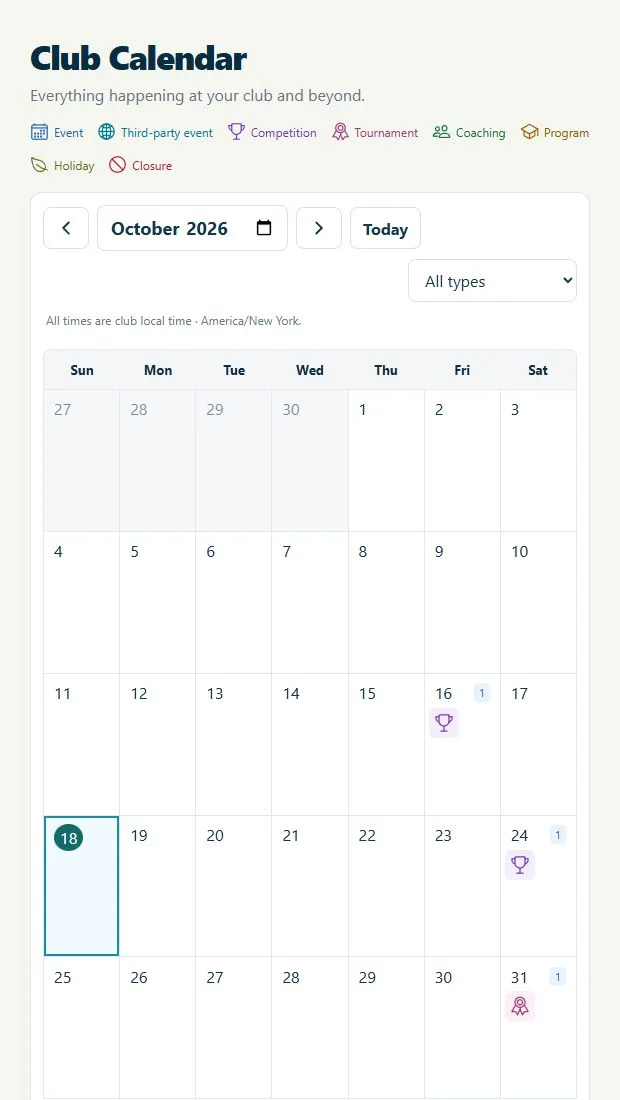
Bring club life into a calendar that members and visitors can understand. Show eligible competitions, tournaments, coaching and program sessions alongside your own club events, outside events, holidays and closures. Dates, locations, organizers and links give each entry context, while public and member destinations take people to the appropriate event information. Private group events stay out of the public calendar.

Explore the Members app
Explore what’s included11 subfeatures explained
  • Club events

    Add the club’s own activities with dates, times and descriptive details.

  • Outside events

    List third-party events with their organizer and external link so members can explore them.

  • Holidays

    Add holiday entries and indicate whether the club is closed.

  • Club closures

    Make closure periods visible so visitors and members can plan their visit.

  • Competition and tournament dates

    Include eligible public competitions and tournament rounds from the club’s event records.

  • Coaching and program sessions

    Show eligible published or closed coaching and program sessions without re-entering each date.

  • Event details and images

    Include descriptions, locations, organizers and available event images for useful context.

  • Month navigation

    Browse the club schedule by month with dates shown in the club’s timezone.

  • All-day and timed entries

    Represent full-day occasions as well as activities with a defined start and end time.

  • Links to the next step

    Open the relevant public event, Members app entry or registration page when a link is available.

  • Private-event separation

    Keep invitation-only group bookings out of the public calendar feed.

Bring these tools to your club.Get Archery Manager
Illustrative archery club photography for Documents and Videos
Illustrative club photography

Feature 14 / 20

Documents and Videos

Useful knowledge. Easy to find when it matters.

Build a club resource library for rules, guides, learning material and reference information. Organize PDF documents, images and YouTube videos into subjects, with descriptions and filters that help people find the right resource. Choose which materials are public and which belong behind member access, and manage drafts and publication from Admin. YouTube remains the video source rather than a private video-hosting service.

Explore member resources
Explore what’s included11 subfeatures explained
  • Club resource library

    Give members access to the club’s documents, images and YouTube resources from the app.

  • Subject-based resource library

    Create club-defined subjects so learning material and reference documents have a clear place.

  • PDF documents

    Share club guides, policies and other PDF reference material through the resource library.

  • Image resources

    Upload and display supported image resources alongside the library’s documents and videos.

  • YouTube video library

    Organize useful YouTube videos in the club resource library, alongside documents and images.

  • Public resources

    Publish selected library material for people who do not have a club membership.

  • Member-only library access

    Require an eligible member sign-in to access selected library resources. This does not make a YouTube video private.

  • Search and type filters

    Find material by text, subject or resource type: document, image or video.

  • Thumbnails and descriptions

    Add descriptive text and preview images so visitors can recognize the resource they need.

  • Resource publishing controls

    Prepare and preview resource content, then manage subject visibility, ordering and publication.

  • Optional downloads

    Choose whether supported documents and images can be downloaded from the library.

Bring these tools to your club.Get Archery Manager
Actual Archery Manager interface illustrating Competitions and Tournaments
Actual product capture · example or test data. Select to enlarge.

Feature 15 / 20

Competitions and Tournaments

From first entry to the final result.

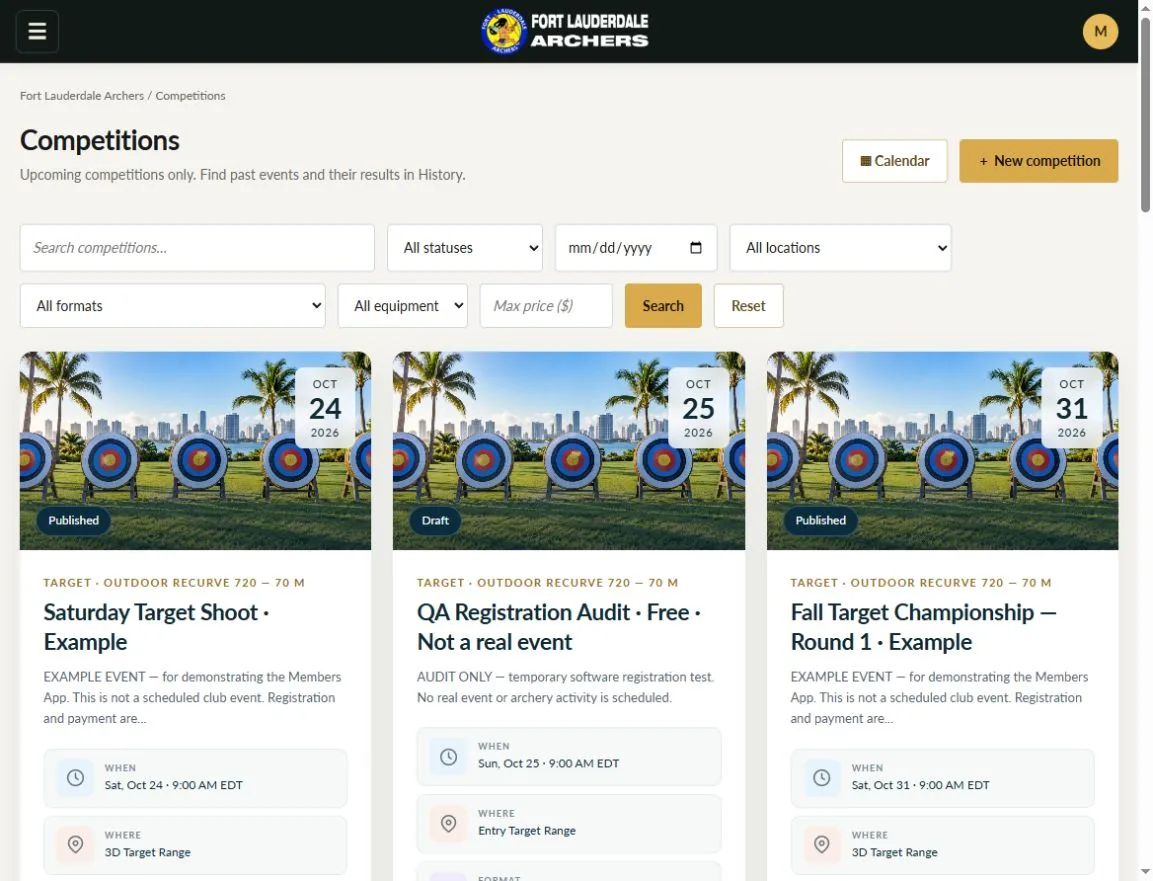
Run competition day and the wider tournament season within the same club system. Configure events, courses, divisions and entry requirements, organize participants and capture scores with the verification your event needs. Combine rounds into tournaments, calculate standings and manage match play where configured. Judges and officials have their own assignments, evidence and decision records, keeping the depth of competition management within the full club picture.

Explore competition administration
Explore what’s included43 subfeatures explained
  • Competition creation and management

    Create an event, set its details and schedule, configure participation and manage its lifecycle.

  • Archery game types

    Set up game definitions and their rule versions so an event uses a defined scoring configuration.

  • Target, field and 3D scoring configurations

    Choose available scoring configurations and course rules for target, field and 3D events.

  • World Archery scoring presets

    Start from familiar recurve, compound and barebow scoring cores, then configure the event rules. Organizers remain responsible for official requirements.

  • ASA, IBO and NFAA scoring presets

    Use the available scoring-core presets as a starting point, with the appropriate event configuration and official review.

  • Course and target setup

    Describe the course stations, targets, distances and relevant specifications for the configured event.

  • Competition divisions and classification

    Organize participants by the event’s configured age, equipment and other classification rules.

  • Member and guest entries

    Accept members and guests through the participation options and requirements enabled for the event.

  • Entry checklist

    Bring payment, eligibility, signatures and other configured requirements together before participation.

  • Participant check-in

    Record arrival and follow the event’s readiness workflow as participants come to the range.

  • Group and flight placement

    Place participants into shooting groups or flights and manage the available placement preferences.

  • Team rosters

    Manage team participants and the team scoring workflows offered by the configured event.

  • Arrow-by-arrow score entry

    Record individual arrow values and validate them against the rules saved for the event.

  • Round and end progress

    Track scoring totals and see which rounds or ends are complete or still need attention.

  • Independent score verification

    Collect independent scoring entries or verification according to the event’s chosen policy.

  • Photographic score evidence

    Attach available photographic evidence to supported scoring records with controlled access.

  • Score disagreement handling

    Review disagreements between recorded scores and resolve them through the configured scoring workflow.

  • Scorecard sign-off

    Collect the participant and official signatures required to complete the configured scorecard.

  • Printable scorecards

    Produce the available paper scorecards for competitions that need a printed scoring record.

  • Live and provisional standings

    Distinguish provisional results from verified and published standings as scoring progresses.

  • Competition history

    Retain earlier event results and entry records so the club and participants can revisit past shoots.

  • Competition exports

    Export the available result, roster, financial and official-record outputs for the relevant event.

  • Multi-competition tournaments

    Group multiple competition rounds into a tournament or series with a shared standings calculation.

  • Offered and required round counts

    Define how many rounds of each competition type are offered and required in the tournament.

  • Minimum participation requirements

    Set the participation needed for an archer to qualify for the tournament’s standings.

  • Best-score aggregation

    Use available best-N calculations to count selected scores and drop lower results where configured.

  • Tournament standings

    Calculate overall standings from eligible rounds and the tournament’s configured participation rules.

  • Tournament enrollment and payments

    Keep tournament enrollment and the associated entry-payment workflow connected.

  • Tournament guest administration

    Manage tournament guests separately within supported participation workflows.

  • Individual match play

    Create qualification-based individual brackets and record progression through configured matches.

  • Team match play

    Run the available team bracket workflow for an event configured for team match play.

  • Set and cumulative matches

    Use the available set-based or cumulative scoring mode for the configured match format.

  • Tie-breaks and shoot-offs

    Apply the available qualification tie and match shoot-off workflows under the event’s rules.

  • Tournament exports

    Export available tournament results and roster information for club administration.

  • Judge directory

    Keep judge records organized so the club can manage the officials involved in its events.

  • Judge assignments and responses

    Assign officials to event work and record their responses to those assignments.

  • Judge worklist

    Give judges a view of their assigned competition work and the scoring access appropriate to it.

  • Official incident records

    Record competition incidents and the official decisions made through the available review process.

  • Eligibility and publication checks

    Apply the required official clearances before the relevant event actions or result publication.

  • Decision history and evidence

    Keep the reasons, available evidence and recorded resolutions associated with official decisions.

  • Official record exports

    Prepare the available event evidence bundle and official-record exports for review or retention.

  • Results submission preparation

    Prepare supported results output for submission, with the club retaining control of the final submission process.

  • Audit integrity checks

    Use supported integrity records and checkpoints to help review the club’s recorded administrative history.


Bring these tools to your club.Get Archery Manager
Actual Archery Manager interface illustrating Online Shop
Actual product capture · example or test data. Select to enlarge.

Feature 16 / 20

Online Shop

A club shop members can actually use.

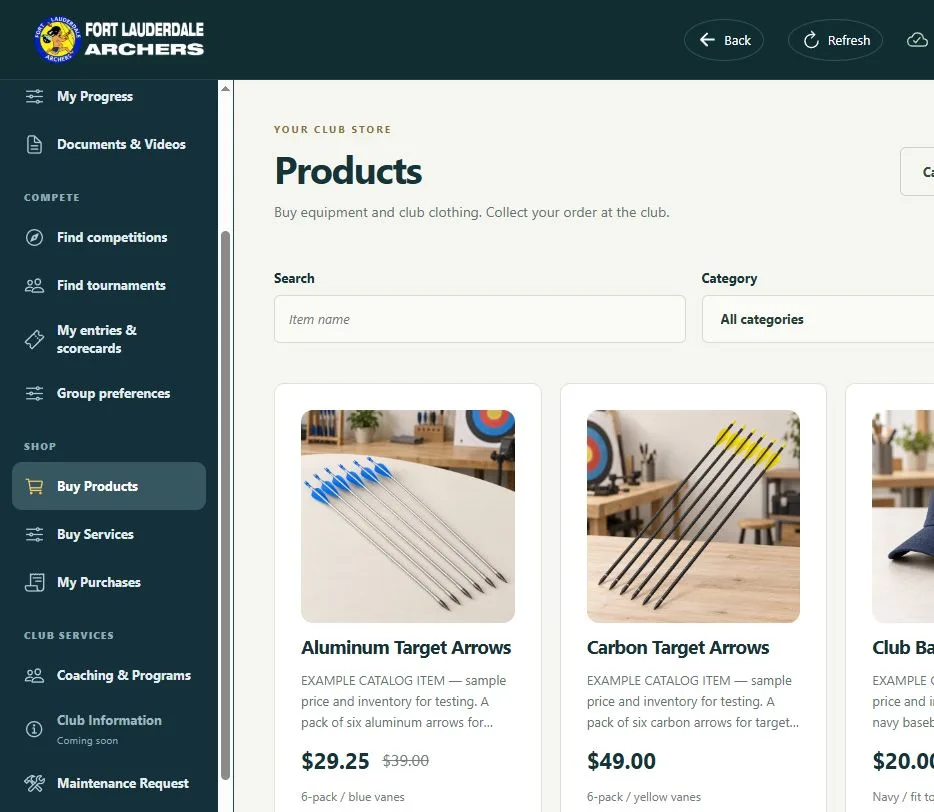
Offer archery products, equipment and club clothing through the Members Store. Publish photographs, descriptions, prices and available options, let members build a cart and complete checkout, and keep order history and fulfillment visible. Stock checks and connected payment records help your team manage what has been purchased, with collection information and invoices supporting the next step.

Explore the Members Store
Explore what’s included9 subfeatures explained
  • Online product catalog

    Publish products with the descriptions, images and prices members need before buying.

  • Product options and variants

    Offer available product variations and show the options relevant to a member’s purchase.

  • Product stock checks

    Check product availability during the purchase process and account for active checkout holds.

  • Shopping cart

    Let members add products, change quantities and remove items before checkout.

  • Checkout and order history

    Give members a checkout workflow and a record of their purchases and order details.

  • Store specials

    Prepare promotional offers and manage specials within the club’s product catalogue.

  • Order fulfillment

    Review paid orders and track the work needed to prepare or fulfill the purchased items.

  • Paid-order invoices

    Generate the available paid-order invoice and include it with the appropriate email workflow.

  • Club collection instructions

    Tell members how to collect their purchased products at the club.

Bring these tools to your club.Get Archery Manager
Illustrative archery club photography for Coaching and Programs
Illustrative club photography

Feature 17 / 20

Coaching and Programs

Build participation that lasts beyond a single session.

Organize the continuing activities that help your club grow: after-school groups, summer camps, multi-session programs and private lessons. Keep age-appropriate enrollment, guardian information, attendance and optional transport details together. Manage bookable lessons and services with instructors, technicians and available time slots. Single-session public coaching is covered under Coaching Events; this area brings ongoing programs and individual appointments into focus.

Explore the Admin system
Explore what’s included13 subfeatures explained
  • Programs for different age groups

    Offer programs for different ages and stages, with child-specific registration steps where appropriate.

  • After-school programs and summer camps

    Organize activities spanning several scheduled sessions rather than a single event.

  • Guardian enrollment for children

    Let a parent or guardian register a child with the participant details and consent required by the program.

  • Emergency and authorized pickup contacts

    Keep emergency contacts and the people permitted to collect a child with the program booking.

  • Optional transport

    Offer pickup, return or both for program participants when enabled by your club.

  • Transportation locations and capacity

    Configure offered journeys, addresses/locations and available transport places.

  • Separate transport pricing

    Attendance, pickup and return prices in supported enrollment configurations.

  • Program attendance and transport tracking

    Keep attendance and applicable transport records associated with the participant’s scheduled sessions.

  • Service catalog and prices

    Define the bookable club services offered to members and the prices attached to them.

  • Private lesson bookings

    Offer individual lesson appointments separately from public coaching events and multi-session programs.

  • Instructors and technicians

    Maintain the people who deliver lessons and bookable club services.

  • Bookable time slots

    Set staff availability and check whether a lesson or service time is available before booking.

  • Lesson and service booking calendar

    Give administrators a calendar view of appointments and their scheduled times.

Bring these tools to your club.Get Archery Manager
Illustrative archery club photography for Maintenance and Workforce
Illustrative club photography

Feature 18 / 20

Maintenance and Workforce

Keep the range ready—and the work visible.

Bring employees, volunteers, vendors, maintenance requests and equipment records into one working picture. Assign tasks with clear instructions and due dates, record progress and work performed, and generate due jobs from recurring service plans. A mobile-friendly Worker app supports the people doing the work, while time records, evidence and reporting help administrators follow through on the responsibilities behind a well-run range.

Explore club operations
Explore what’s included19 subfeatures explained
  • Employees, volunteers and vendors

    Keep records for employees, volunteers and vendors, with optional links to their member accounts.

  • Worker profiles and departments

    Organize worker contact and company information, department membership and access status.

  • Task management

    Assign work with instructions, a priority and a due date so responsibility is clear.

  • Task progress and completion

    Created, assigned, in-progress, on-hold, canceled and done states with completion outcomes.

  • Worker app

    Give enabled workers a separate mobile-friendly interface for the workforce workflows they can access.

  • Worker clock-in and clock-out

    Record start and finish times for workers whose time recording is enabled.

  • GPS punch validation

    Enable approved-location and accuracy checks for worker time punches when the device and its location permissions support them.

  • Punch photo evidence

    Choose whether worker time punches need camera evidence, with a suitable device and the required camera permission.

  • Work logs

    Record work performed and the time spent against the relevant supported tasks.

  • Time records and corrections

    Review workforce time records and make permitted corrections or void entries with a recorded reason.

  • Maintenance requests

    Take a maintenance issue from submission through triage, assignment and closure.

  • Member maintenance reporting

    Let members report maintenance issues through the member-facing request workflow.

  • Equipment asset records

    Asset tags, serials, condition, location, purchase and warranty details for maintenance purposes.

  • Equipment service status

    Show whether an equipment asset is available, being serviced, out of service or retired.

  • Recurring service plans

    Configure recurring equipment service work and generate tasks as the planned work becomes due.

  • Locations

    Define workforce and maintenance locations, including the optional GPS settings used for time punches.

  • Attachments and evidence

    Files associated with supported tasks/requests and controlled evidence access.

  • Workforce reports and CSV exports

    Filter and review supported task and time reports, then export the relevant records.

  • Workforce history

    Review recorded changes to assignments, tasks and time entries when following up on work.

Bring these tools to your club.Get Archery Manager
Illustrative archery club photography for Access Control
Illustrative club photography

Feature 19 / 20

Access Control

Make access part of managing the club.

Bring the available Total Entry access-control option into your club operation. Access control complements the membership and administration system, helping your club manage its physical entry arrangements as part of the wider setup. Hardware and site requirements are considered for the installation. Access-control hardware is purchased separately and an additional subscription applies; those prices are still to be determined.

Ask about access control
Explore what’s included2 subfeatures explained
  • Access-control option

    Include the available physical access-control system in the club’s setup with separate hardware and subscription charges.

  • Total Entry integration

    Bring the available Total Entry access-control system into your club operations. Separate hardware and subscription charges apply.

Bring these tools to your club.Get Archery Manager
Actual Archery Manager interface illustrating Mobile and PC Apps
Actual product capture · example or test data. Select to enlarge.

Feature 20 / 20

Mobile and PC Apps

Run the club. Be part of the club. On the device at hand.

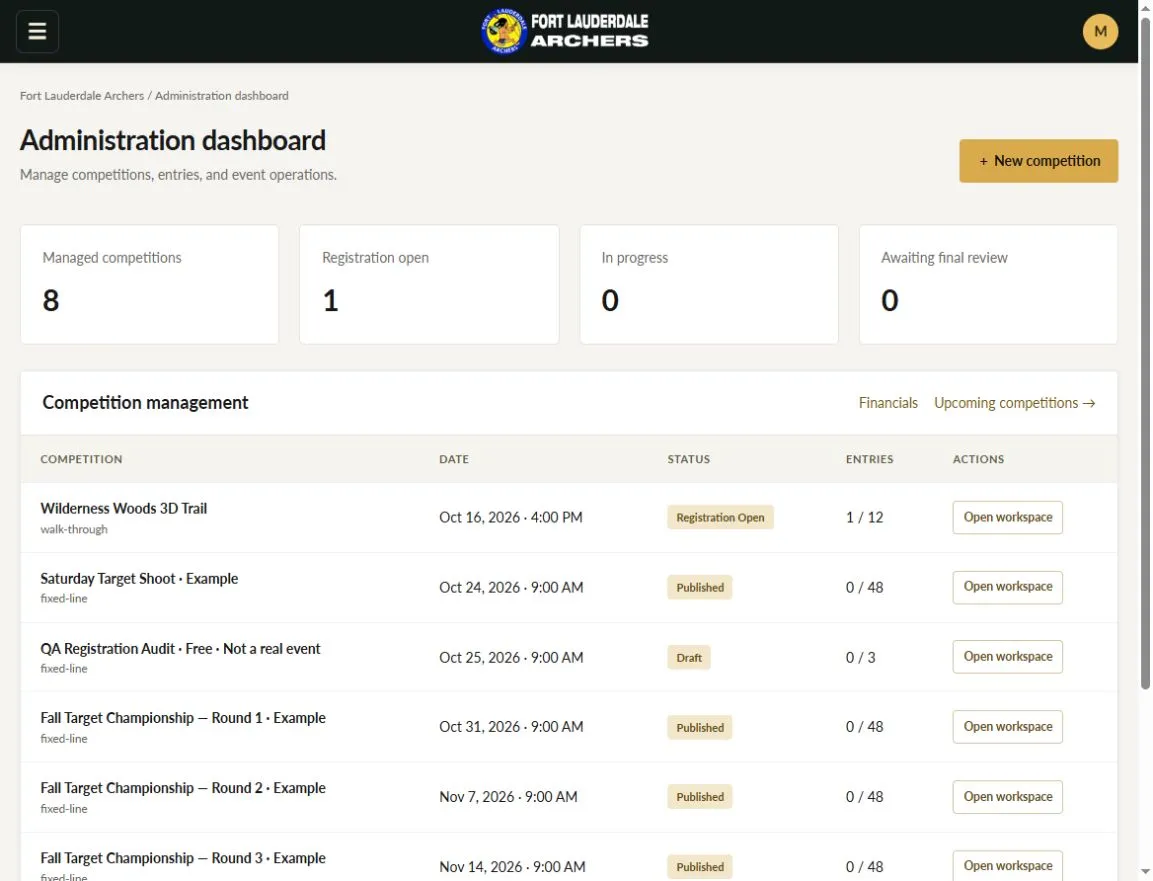
Give each audience an experience built around its role. Administrators use the Admin system to manage club work; archers and families use the Members app to take part. Both work on phones, tablets and PCs, with home-screen installation on supported devices. Club identity, account permissions and protected records keep the experience organized as people move between membership, activities, entries and purchases.

Explore the Members app
Explore what’s included19 subfeatures explained
  • Admin dashboard

    Start with a central view of club administration and move between the working areas that keep your club running.

  • User administration

    Manage club accounts and activation, so the people involved in your club have the access they need.

  • Role-based access

    Assign the appropriate Admin, Director, Judge, Member and Guest permissions for each person’s responsibilities.

  • Audit log

    Review recorded administrative and operational changes, helping your team understand what happened and follow up.

  • Club settings

    Choose the settings that fit your enrollment, payments, competitions, communications and other club activities.

  • Installable Admin app

    Add the browser-based Admin app to a supported device for convenient access to club work.

  • Protected record access

    Give authorized people access to the relevant supported record through protected links and permission checks.

  • Mobile-friendly members app

    Give archers and families access to their club from phones, tablets and computers.

  • App installation

    Let members add the club app to their home screen or desktop for convenient access.

  • Saved club selection

    Keep saved club connections in the app so a member can return to the relevant club experience.

  • Member dashboard

    Give the signed-in member a personal starting point for membership information and club activity.

  • Competition and tournament browsing

    Let members browse event information, participation details, entries and available results.

  • Personal entry tracking

    Bring a member’s entries, remaining requirements and competition progress into their own view.

  • Member profile and family access

    Let members use the profile, membership and family workflows available to their account.

  • My signatures

    Give members access to their signed club documents through the app’s signature area.

  • Shop and booking access

    Let members browse products, services and lessons, then reach their cart and purchase history.

  • Offline score queue

    Save supported score entries locally and synchronize when connectivity returns. Other app activities may require an internet connection.

  • Distinct Admin and Members experiences

    Give administrators club-management tools and members the participation tools appropriate to their role.

  • Phone, tablet and PC access

    Use responsive interfaces across supported browsers on everyday devices.

Bring these tools to your club.Get Archery Manager

One connected club.
A straightforward start.

See the full pricing

A better way to run your club

More time for the people.
Less time on the paperwork.

Get Archery Manager. We verify clubs before approval. Then import your members with our CSV instructions. Free email support.

Get Archery Manager